R2V Related News
-
R2V Major New Release 7.0: Refined User Interface and Improved Performance (July, 2012)
-
R2V New Version 6.5: New Functions For Editing Vector Attributes (March, 2008)
-
R2V New Release: Merge Multiple Map Sections into a Single Map
-
New Version: SVG (Scalable Vector Graphics) Export Implemented
-
New Release: Improved Image Warp and Automated Vectorization
-
R2V New Release, Improved Vectorization and New Color Fusion...
-
R2V Year 2000 Version, New Functions for Image Mosaic, Registration, and More.
-
Second Installation of 50 R2V Licenses at India National Informatics Center
-
India National Informatics Center Purchased 50 Licenses of R2V
-
R2V 3.2, Supports Multi-Layers, GeoTIFF, and Image Draping for 3D Display
-
R2V Selected by Thailand Ministry of Transport and Communication
-
R2V Automates Mapping for Mine Clearance Mission in Cambodia
-
World Wildlife Fund Chooses R2V for Automated Map Digitizing
-
R2V 2.13 Released, Raster Image Editing and Improvements in Interactive Line Tracing
-
R2V for Windows Supports 32-bit Platforms: Windows 95 and NT
R2V Major New Release 7.0: Refined User Interface and Improved Performance
July, 2012
Able Software announced a major new release for its R2V software, an advanced raster to vector conversion software being used in more than 100 countries.
This new release includes major user interface redesign and image processing performance inprovments. The toolbars have been updated to make more identifiable and easy to understand. The bird's eye window is improved to be more responsive and uses a much bigger size to display more image details. The Menu items have been reorganized to steamline the workflow for map digitizing and raster to vector conversion software. The new release is available at no cost to R2V users who is within the 1-year support period or under support contract. Other users can contact Able Software to purchase the upgrade or sign up for the support contract.Version 6.5: New Functions for Editing Vector Attributes
(March 24, 2008)
This version includes the following new functions and
improvements:
1.
"Edit/Line Attributes": use this function to edit line attributes,
including the ID values. The attributes can be exported to a database
(DBF file) in the case of shapefile. Unlimited number of fields can be
used for attributes (limited by computer capacity of course). The
attrbutes table can be sorted as well. The "Assign ID" option under
Line Editor has been removed since it's much easier to edit the IDs
using the Attributes function or the "Label Contours" option.
2. "Edit/Point Attributes": same as above, for points.
3.
The auto vectorization process detects line width information from the
scanned map or image. The new "View/Overlay/Line Width" command can be
used to turn on the display of detected line widths.
4.
A new "Vector/Select Lines by Width" function is implemented to allow
you to separate lines into a different layer by their widths.
5.
The display for Line Ends has been enhanced to show the direction with
which a line was traced. It goes from a circle to an arrow. This is
useful for some data where line direction has meanings.
6.
Under the "Line Editor", a new function "Reverse" is added to reverse
line direction. This option is often used together with the new Line
Ends display.
7. Added options to include line/point ID values as Z when exporting to
shapefile (3D shapefile).
8. Improved R2V online help file.
9.
Please note the new project file (with attributes) is different from
the project files generated from previous versions of R2V. R2V is
backward compatible but older versions of R2V won't be able to open the
new project file.
Improved Tracing and Simpler Operations (March, 2008)
A new version of R2V is now available to R2V users with a support contract or within the one year free support period. It can be downloaded from: http://www.ablesw.com/r2v/support.html.
This new version includes the following new functions and improvements:
1. Reload Image command: this new command is used to reload the original image to undo all the changes made to the image. For example, a color image can be converted to grayscale for thresholding and auto vectorizing. After the image is vectorized, the original color image can be reloaded and used as the backdrop for vector editing.
2. New Pan Tool: this tool is used to move image around within the image window.
3. Improved Line Editor commands:
3.1 Added undo support to line tracing to continue tracing when a line is completed.
3.2 Snap to Line option. This forces the starting and ending points of a polyline to be on the closest line that is nearby when tracing.
3.3 Improved the Free Tracing Tool.
3.4 Automatic window scrolling in tracing mode. When in tracing mode, window scrolling will happen as the cursor touches the side of the window.
4. New "All On/Off" button for the Layer Define command. This button can be used to turn all layers on or off. It's convenient when you have a large number of layers to manage.
5. Improved the quality and speed of the Auto Vectorization command.
6. Other minor improvements.
New Release: Merge Multiple Map Sections into a Single Map
9/4/2007 (Lexington, MA) - Able Software has released a new version for its automated raster to vector conversion software, R2V. New features include functions to easily merge digitized map sections into a single map. Click here to watch a tutorial video for merging maps.
R2V supports fully automatic vectorization to convert scanned maps and drawings to vector formats. Vector-based map layers can also be generated automatically from natural source images such as aerial photos and satellite imagery using the color classification and the boundary line tracing functions. Both color and black/white images stored in TIFF, GeoTIFF, JPEG, RLC, GIF, PNG or BMP formats, can be digitized automatically for center lines or boundary lines. Geo-referencing is done automatically using GeoTIFF information or through user defined control points. All geographic projections systems and conversion between them are supported. R2V exports vector data to ArcView Shapefile, Arc/Info Generate, MapInfo MIF/MID, IGES, AutoCAD DXF, SVG ( Scalable Vector Graphics) and MapGuide SDL formats.
The batch mode processing is used to digitize a large number of images using a customized script. 3D DEM (digital terrain model) can be created automatically from vectorized topo maps or XYZ point clouds and exported to USGS DEM format, as well as 3D VRML and STL formats for 3D printing applications. A color or grayscale image such as aerial photo or satellite imagery can be easily draped to the surface of a 3D DEM for 3D display and printing. R2V includes complete on-screen image and vector editing, labeling, image rubber sheeting, color image classification and separation, text symbol detection and recognition (OCR), automatic polygon layer creation, 3D terrain display and image draping. R2V is currently being used in more than 60 countries for automated map digitizing and GIS data capture applications.
This new release is available free of charge to R2V users with a support contract or within the one year free support period by downloading from Able Software’s website at www.ablesw.com. Able Software has been providing free R2V upgrades to its licensed users since 1994.
New Version: SVG (Scalable Vector Graphics) Export Implemented
9/12/2005 (LEXINGTON, MA) – Able Software has released a new version for its automated raster to vector conversion software, R2V. New features include SVG (Scalable Vector Graphics) export, batch processing of OCR (optical character recognition) and improved performance of vectorization.
This new version supports fully automatic vectorization to convert scanned maps and drawings to vector formats. Vector-based map layers can also be generated automatically from natural source images such as aerial photos and satellite imagery using the color classification and the boundary line tracing functions. Both color and black/white images stored in TIFF, GeoTIFF, JPEG, RLC, GIF, PNG or BMP formats, can be digitized automatically for center lines or boundary lines. Geo-referencing is done automatically using GeoTIFF information or through user defined control points. All geographic projections systems and conversion between them are supported. R2V exports vector data to ArcView Shapefile, Arc/Info Generate, MapInfo MIF/MID, IGES, AutoCAD DXF, SVG ( Scalable Vector Graphics) and MapGuide SDL formats.
The batch mode processing is used to digitize a large number of images using a customized script. 3D DEM (digital terrain model) can be created automatically from vectorized topo maps or XYZ point clouds and exported to USGS DEM format, as well as 3D VRML and STL formats for 3D printing applications. A color or grayscale image such as aerial photo or satellite imagery can be easily draped to the surface of a 3D DEM for 3D display and printing. R2V includes complete on-screen image and vector editing, labeling, image rubber sheeting, color image classification and separation, text symbol detection and recognition (OCR), automatic polygon layer creation, 3D terrain display and image draping. R2V is currently being used in more than 60 countries for automated map digitizing and GIS data capture applications.
New Release: Improved Image Warp and Automated Vectorization
8/12/2004 (LEXINGTON, MA) – Able Software has released a new version for its automated raster to vector conversion software, R2V. This new version supports fully automatic vectorization to convert scanned maps and drawings to vector formats.
Vector-based map layers can also be generated automatically from natural source images such as aerial photos and satellite imagery using the color classification and the boundary line tracing functions. Both color and black/white images stored in TIFF, GeoTIFF, JPEG, RLC, GIF, PNG or BMP formats, can be digitized automatically for center lines or boundary lines. Geo-referencing is done automatically using GeoTIFF information or through user defined control points. All geographic projections systems and conversion between them are supported.
R2V exports vector data to ArcView Shapefile, Arc/Info Generate, MapInfo MIF/MID, IGES, AutoCAD DXF and MapGuide SDL formats. The batch mode processing is used to digitize a large number of images using a customized script. 3D DEM (digital terrain model) can be created automatically from vectorized topo maps or XYZ point clouds and exported to USGS DEM format, as well as 3D VRML and STL formats for 3D printing applications. A color or grayscale image such as aerial photo or satellite imagery can be easily draped to the surface of a 3D DEM for 3D display and printing.
R2V includes complete on-screen image and vector editing, labeling, image rubber sheeting, color image classification and separation, text symbol detection and recognition (OCR), automatic polygon layer creation, 3D terrain display and image draping. R2V is currently being used in more than 60 countries for automated map digitizing and GIS data capture applications.
This new release is available free of charge to all licensed users by downloading from Able Software’s website at www.ablesw.com. Able Software has been providing free R2V upgrades to its licensed users since 1994.
R2V
NEW UPDATE 5.5.020916
9/17/2002 (LEXINGTON, MA) – Able Software has released a new update for its automated raster to vector conversion software, R2V.
This new version includes a new image mosaic function that uses overlapped regions to create seamless image mosaic. Image sections scanned using a small size scanner can be stitched together to create a single image. The 3D VRML export for DEM (digital terrain model) has been improved to include image draping and color texture information for 3D visualization through the Internet and physical model creation using a 3D printer. More display controls have been added to 3D display to adjust vertical scale and other properties. The batch script processing has additional image and vector processing functions.
R2V is an automated raster to vector conversion software developed by Able Software for mapping and GIS applications. R2V converts images stored in TIFF, GeoTIFF, BMP, JPEG, GIF, PNG and RLC image formats to a vector file format, such as Arc/Info generate, ArcView Shape file, MapInfo MIF/MID file, AutoCAD DXF, IGES, MapGuide SDL and others.
Raster images can be registered to another image to correct geometric distortions and geo-referenced to a real world coordinate system. Raw uncompressed image formats, such as formats used by satellite imagery, can be opened using R2V’s new raw image import function. Image regions of interest (ROI) in any shape are used for cropping and automatic vectorization. Color image classification function separates colors into vector data layers for easy editing and management. 3D DEM (digital terrain model) can be created from labeled contour lines for 3D visualization and analysis.
R2V SELECTED BY UNITED NATIONS
(January 17, 2001, Lexington, MA, USA) – The United Nations Development Programme (UNDP) has purchased 4 copies of R2V software from Able Software for their map digitizing and GIS data capture applications.
UNDP is the United Nations' principal provider of development advice, advocacy and grant support. Its core programs focus on the countries that are home to 90 percent of the world's extremely poor people. UNDP helps governments in developing countries to improve policies and build a greater institutional capacity for delivering basic services and reducing poverty. GIS and computer mapping technologies have played an import role for program planning, progress monitoring and effective management of UNDP projects.
R2V is an automated raster to vector conversion software developed by Able Software for mapping and GIS applications. R2V converts images stored in TIFF, GeoTIFF, BMP, JPEG, GIF and RLC image formats to a vector file format, such as Arc/Info generate, ArcView Shape file, MapInfo MIF/MID file, AutoCAD DXF, MapGuide SDL and others. Raster images can be registered to another image to correct geometric distortions and geo-referenced to a real world coordinate system. Raw uncompressed image formats, such as formats used by satellite imagery, can be opened using R2V’s new raw image import function. Image regions of interest (ROI) in any shape are used for cropping and automatic vectorization. Color image classification function separates colors into vector data layers for easy editing and management. 3D DEM (digital terrain model) is created from labeled contour lines for 3D visualization and analysis.
R2V VERSION 5.0.7 RELEASED
(January 16, 2001, Lexington, MA, USA) -- ABLE SOFTWARE announced a new release (Version 5.0.7h) of R2V, its automated raster to vector conversion software for mapping and GIS data capture applications.
In this new release, R2V added a new function to convert 1-bit monochrome black/white image to 8-bit greyscale. For an 8-bit greyscale image, advanced image processing functions, such as smoothing, filtering, thresholding and noise removal can be applied.
In addition to the center line tracing, the boundary line tracing algorithm is improved for 1-bit image monochrome images. The 3D DEM (digital terrain model) export is updated to be compatible with USGS (US Geological Survey) new DEM format specification. A new algorithm for the 3D image draping function is implemented to better match a surface image to the DEM data when they are in different scale.
R2V supports commonly used image file formats, including TIFF, GeoTIFF, BMP, JPEG, GIF and RLC image formats. Images stored in these formats can be automatically vectorized and exported to a vector file formats, such as Arc/Info generate, ArcView Shape file, MapInfo MIF/MID file, AutoCAD DXF, MapGuide SDL and other formats. Raster images can be registered to another image to correct geometric distortions and geo-referenced to a real world coordinate system. Raw uncompressed image formats, such as formats used by satellite imagery, can be opened using R2V’s new raw image import function. Image regions of interest (ROI) in any shape can be defined for cropping and automatic vectorization.
This new release is free of charge to licensed R2V users and can be downloaded from Able Software’s website at (http://www.ablesw.com/r2v).
Able Software Opens New Training Center
(April 5, 2000, Lexington, MA, USA ) – ABLE SOFTWARE has purchased a new technical support and training center in Billerica, MA, USA to accommodate the growing demand of product training and technical support operation of its automated raster to vector conversion software, R2V.
The expanded operations are in direct response to the rapidly increasing number of users and applications. This new training center is located in Boston’s Interstate 128 high tech region. Advanced presentation equipment and computers are installed for the use of training courses and sales demonstrations.
Training courses for R2V will be provided weekly at the new training center. The courses are taught directly by software developers and technical support staff to provide detailed information about the software and the applications. Users are encouraged to bring their own images to the training so they can learn specifically the functions needed to get their work done.
Detailed training schedules and topics are available at Able Software’s website (www.ablesw.com). Private group training can be arranged through the sales department.
R2V NEW RELEASE, Improved Vectorization and New Color Fusion...
(April 3, 2000, Lexington, MA, USA) -- ABLE SOFTWARE announced a new release of R2V (Version 5.0.3), its automated raster to vector conversion software for mapping and GIS data capture applications used in more than 60 countries.
R2V supports both color and black/white images in TIFF, GeoTIFF or BMP formats and converts the image to vector format automatically. It exports vector file formats to ArcView Shapefile, Arc/Info Generate file, MapInfo MIF/MID, AutoCAD DXF and MapGuide SDL file. Labeled contour lines can be used to create 3D DEM or grid file for 3D visualization and analysis.
This new release includes performance improvements to the fully automatic raster to vector conversion function to vectorize different map types including topographic and parcel maps. Closed polygons are automatically created from line segments after being vectorized.
A new proprietary image fusion function is implemented to colorize a high resolution greyscale image using color information from low resolution multi-spectral images. Non-standard raw binary images can now be imported using the new image import function. The image registration function has been improved to use either bi-linear or triangulation method for image geometric transformation.
The new image mosaic function provides a simple layout interface for creating a seamless mosaic image from multiple sub images. Most image types, including 1-bit monochrome, 8-bit greyscale and 8 or 24-bit color images are supported. Users with small format scanners can now scan smaller sections and merge them together for vectorization and other processing.
This new release is free of charge to all current R2V users and can be downloaded from Able Software’s website at (http://www.ablesw.com/r2v).
R2V Year 2000 Version, NEW FUNCTIONS FOR IMAGE MOSAIC, REGISTRATION, AND MORE...
(November 29, 1999, Lexington, MA, USA) -- ABLE SOFTWARE announced today the new release of R2V version 5.0, its automated raster to vector conversion software for mapping and GIS data capture applications used in more than 60 countries.
This new release includes improvements to the fully automatic raster to vector conversion function to vectorize both black/white and true color images with a single command. New image mosaic function provides a simple layout interface for creating a seamless mosaic image from multiple sub images. Most image types, including 1-bit monochrome, 8-bit greyscale and 8 or 24-bit color images can be used by this function. Users with small format scanners can now scan smaller sections and merge them together for vectorization and other processing.
The image warp and registration function has added options to use either bi-linear or triangulation for more accurate image geometric transformation based on control point selection. Other image processing functions include color image classification, geo-referencing, dark background removal, despeckle and segmentation.
R2V supports raster images in TIFF, GeoTIFF or BMP formats and export vector file formats include ArcView Shapefile, Arc/Info Generate file, MapInfo MIF/MID, AutoCAD DXF and MapGuide SDL file. Labeled contour lines can be used to create 3D DEM or grid file to 3D visualization and analysis.
This new release is free of charge to all current R2V users and can be downloaded from Able Software’s website at (http://www.ablesw.com/r2v).
The list price for R2V is US$1495 per license. Educational price is US$960. A fully functioning demo version is available from Able Software’s website.
Second Installation of 50 R2V Licenses at India National Informatics Center
(November, 1999) After a year of using 50 R2V workstations extensively for automated map digitizing and GIS data capture applications, THE NATIONAL INFORMATICS CENTER (New Deli, India) of India has purchased another 50 licenses of R2V for Windows from Able Software through PCI Enterprises (http://www.pcigeomatics.com) of CANADA. R2V is an automated raster to vector conversion software for map digitizing and GIS data capture applications used in more than 60 countries.
GIS and computer mapping technologies have been widely adopted in India by government agencies and private enterprises in recent years. The trend to move from paper based systems to modern computer based mapping and GIS systems has made it critical to use automated raster to vector conversion software such R2V for large scale map digitizing and GIS database creation projects. With R2V, a scanned contour map can be vectorized automatically in few seconds. The batch mode processing can automate the conversion of a large number of maps without any human intervention. The automated conversion not only increases the accuracy by avoiding human errors, but also provides the speed needed for large scale mapping projects.
THE NATIONAL INFORMATICS CENTER uses R2V to automate the digitizing of large number of paper maps for its national GIS database for the Indian Government. The paper maps are first scanned, and then vectorized and edited using R2V running on Windows computers at the Center. The final vector data will be used by GIS systems for many different types of government planning and assessment applications.
"We are pleased to see that the INDIA NATIONAL INFORMATICS CENTER's GIS and computer mapping applications expanding so rapidly and their satisfaction with R2V after a year of use on a daily basis. With a total of 100 R2V licenses installed at the Center, it will greatly speed up the process of creating GIS database at a scale this large. R2V is currently being used by many government agencies and organizations India, such as World Wildlife Fund and Center for Advanced Computing, to create vector maps for GIS and mapping applications. R2V's capability of handling all image types (black and white, greyscale and color) and its specific GIS related functions have made it the obvious choice for map digitizing projects such as this." Commented Dr. Yecheng (Ted)Wu, the founder and president of Able Software LLC.
R2V VERSION 4.0 RELEASED
(July, 1998, Lexington, MA, USA) ABLE SOFTWARE CORP. has announced a major new release 4.0 for its advanced raster to vector conversion software R2V.
This new release includes new function implementations and improvements, such as improved multiple layer support, polygon layer creation and easy to use interactive polygon editing tools, 3-D DEM creation from labeled contour maps, and improve fully automatic vectorization and interactive line tracing functions.
R2V is currently being used in more than 60 countries for automated map digitizing and GIS data capture applications. R2V supports both fully automatic vectorization and semi-automatic interactive tracing from scanned maps and other raster image sources. Export vector file formats include Arc/Info, ArcView Shape, MapInfo MIF/MID, AutoCAD DXF, MapGuide SDL, 3-D XYZ, Grid and DEM formats.
According to Dr. Yecheng Wu, president and founder of Able Software, a new set of polygon generating and editing tools have been implemented to simplify digitizing of complex maps such as parcel and tax maps. The user interface is also updated to allow the use of fill hatch patterns for polygon display and editing.
The fully automatic vectorization function has been further improved to provide high quality vector data extraction with just a single command. The interactive line tracing function makes heads-up digitizing as easy as a mouse click for most complex lines found in topographic or parcel maps. The tracing function works not only with black/while maps, but also maps with layers in different colors.
More improvements have been incorporated in the creation of 3-D USGS (United States Geological Survey) compatible DEM data from vectorized contour data. "We are very happy with R2V and it has completely changed our digitizing methods from manual tracing on a tablet to automatic using R2V and a scanner, with major productivity gains and high accuracy.", commented Dr. Tom Dargie, a mapping consultant and R2V user in the United Kingdom. A fully functioning demo version of R2V is available by download from: http://www.ablesw.com
INDIA NATIONAL INFORMATICS CENTER PURCHASED 50 LICENSES OF R2V
(May, 1998) THE NATIONAL INFORMATICS CENTER (New Deli, India) of India has recently purchased 50 licenses of R2V for Windows software from Able Software Co. through PCI Enterprises of CANADA. R2V will be used at the center for large scale map digitizing and GIS database creation projects.
R2V is an advanced raster to vector conversion software widely used for automated map digitizing and large scale GIS data capture applications around the world. The Indian National Informatics Center will use R2V to automate the digitizing of large number of paper maps for its national GIS database for the Indian Government. The large number of paper maps are first scanned, and then vectorized and edited using R2V running on Windows 95 and NT computers at the Center. The final vector data will be used by GIS systems for many different types of government planning and assessment applications.
"The use of R2V's fully automated vectorization will greatly speed up the process of creating GIS database at a scale this large. R2V is currently being used by many government agencies and organizations such as World Wildlife Fund in India, to digitize maps from different sources. R2V's capability of handling all image types (black and white, greyscale and color) and its specific GIS related functions has made it the obvious choice for large scale map digitizing projects such as this." Commented Dr. Yecheng Wu, the founder and president of Able Software LLC.
R2V 3.2 Supports Multi-Layers, GeoTIFF and Image Draping For 3D Display
(January, 1998, Lexington, MA, USA) ABLE SOFTWARE CORP has announced a new release for its advanced raster to vector conversion software R2V version 3.2. This new update has implemented 3D data creation and display functions using the standard OpenGL graphics library under Windows 95 and Windows NT. Multi-layer support has been added to allow vectorization of multiple layers from a single scanned map. Other new features include GeoTIFF support and image draping for 3D data.
R2V supports both fully automatic vectorization and interactive tracing from scanned maps, aerial photos and satellite imagery. R2V's import and export formats include Arc/Info generate, ArcView Shape file, MapInfo MIF, AutoCAD DXF, MapGuide SDL, 3D DEM, grid and XYZ formats. Vectorized lines are first labeled with their elevation or attribute values and the 3D DEM and raster grid file is then created for display and analysis.
The 3D data set can be viewed at a user specified angle and distance or animated using R2V's 3D OpenGL based display functions. An image from other sources, such as aerial photo or satellite image, can be easily draped on to a 3D dataset to create realistic 3D display. The 3D DEM is fully compatible with USGS (United States Geological Survey) DEM format.
Multiple layer structure is added in this new update for flexible vector data processing and editing. Map layers with different attributes can be vectorized separately and organized into layers inside R2V. The multiple layer structure is compatible with the commonly used GIS and CAD packages which support layers. Vector data can be moved or copied between layers. The layer management tool makes it easier to acquire data from complex maps such as a color topographic map with all layers present.
GeoTIFF is an industry standard for geo-referenced raster image stored in TIFF format. R2V 3.2 has added a complete implementation to support the input and output of raster images geo-referenced with either tie points or transformation matrix.
R2V VERSION 3.0 Released
(December, 1997, Lexington, MA, USA) ABLE SOFTWARE CORP has announced a major new release 3.0 for its advanced raster to vector conversion software R2V. This new release includes some major improvements and new function implementation, such as improved fully automatic vectorization, new interactive tracing implementation, 3D grid data creation and display, and other new image and vectors processing functions. R2V is currently being used in more than 60 countries for automated map digitizing and GIS data capture applications.
Click here to see a screen shot of R2V 3.0.
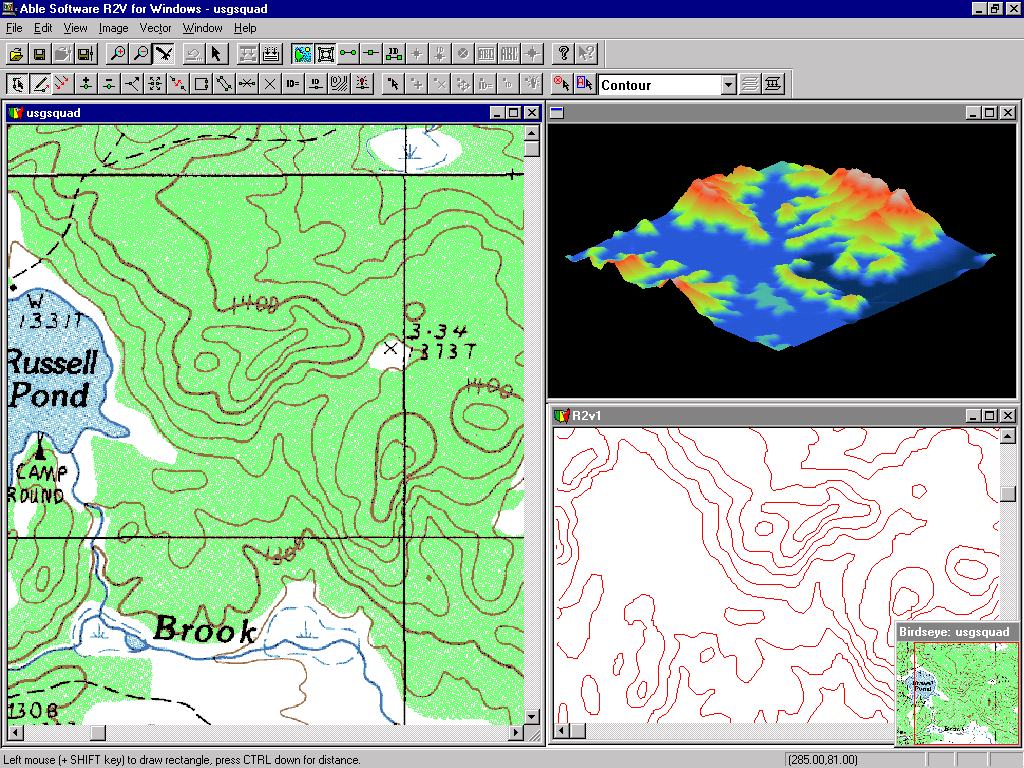
R2V supports both fully automatic vectorization and semi-automatic interactive tracing from scanned maps and other raster image sources. Export vector file formats include Arc/Info, ArcView Shape, MapInfo MIF, AutoCAD DXF, MapGuide SDL, 3-D grid file and 3-D XYZ formats.
This new release includes some major improvements and new function implementations, such as improved fully automatic vectorization, new intelligent interactive tracing implementation and other new image and vectors processing functions. Starting from version 3.0, we will no longer support the 16-bit version for Window 3.1. This decision makes it easier to use all the advanced features provided by Windows 95 and Windows NT 4.0 and improves the overall performance significantly.
Following is a list of new features and improvements in version 3.0:
1. A new intelligent interactive line tracing function has been implemented to allow selective digitizing of lines from complex maps such as parcel maps and topographic maps where all layers are present and mixed. Multi-line tracing is supported to digitize a group of lines with a single selection. If you have used the current interactive tracing function in R2V, you'll notice the big improvements and how much better it performs in the new version.
2. New batch script tool supports high level programming using R2V's rich set of image and vector processing functions. The function script can be applied to automatically process and vectorize a number of raster images without any user intervention. The script editor allows you to interactively apply the script to an image and display the processing results on screen.
3. The fully automatic vectorization function has been rewritten to to fix some of the weak points in the previous version. The broken line problem which happens on processing section boundaries has been fixed in this new version. If you have a good quality original image, you should be able to have it vectorized nicely using the fully automatic function with minimal editing effort.
4. A new bird eye view has been added to show the current location and zoom level for each image displayed and processed. The bird eye window can be used to quickly scroll the image to a specific location.
5. The colors used to display a monochrome or binary image can now be changed using a new function "View/Set Image Color". Many of you have asked for this feature and now we hope you like it.
6. Major user interface redesign. More tool bars are added for those frequently used functions, like View/Overlay functions, editors. Tool tips are now available.
7. 3D grid file creation and real time 3D display of the generated vector data. Animate the 3D display at any angle specified and see the vector data in a brand new way.
8. Implemented import function for AutoCAD DXF, MapInfo MIF/MID and ArcView Shape file.
9. New improved algorithm to create closed polygons from line segments automatically.
R2V Selected by Thailand Ministry of Transport and Communication
(October, 1997) The Thailand Ministry of Transport and Communication has recently purchased 10 licenses of R2V for Windows 95 & NT through Able Software's Thailand Distributor, CDG Systems Ltd. (Tel: 662-678-0978).
R2V is an advanced raster to vector conversion software widely used for automated map digitizing and large scale GIS data capture applications. The Thailand Ministry of Transport and Communication will use R2V to automate the digitizing of large number of paper maps for its national GIS database used for transportation and communication management applications. "The use of R2V will greatly speed up the process of creating the ministry's GIS database by scanning the paper maps and vectorizing automatically with R2V. R2V is currently being used by many Thailand government agencies to vectorize maps from different sources. R2V's capability of handling all image types (black and white, greyscale and color) and its specific map related functions has made it the obvious choice for large scale map digitizing projects." Commented Mr. Natee Punyasukh, Sales Manager for CDG Systems Ltd.
"Able Software has been working closely with the users of R2V since the first release to make sure the software has the right tools to get their maps vectorized easily and cost effective. With the help of our Web site and R2V's internet mailing list, we have been able to maintain a fast pace of quarterly new releases and free upgrades to existing users. This is one of the reasons we can expand our user base to more than 60 countries in a fairly short period of time." Concluded Dr. Yecheng Wu, president and founder of Able Software LLC.
R2V VERSION 2.5.8 Released
(September, 1997, Lexington, MA, USA) This release has implemented several important features for R2V to handle geo-coded or geo-referenced raster image and vector data and make the updating of old vector file generated using R2V or other software more flexible. Following is a list of the new functions and how they can be used:
1. World Reference file (.TFW) is now fully supported by R2V. You can use R2V to generate a TFW file from your control point set using File/Save World File command or use File/Load Control Points/TFW File command to read into R2V a TFW file generated from another package, such as Arc/Info or ArcView.
2. Under View menu, a new function "Geo-Coded Coordinates" is added to switch the display of current mouse pointer coordinates between "geo-coded" (with control points or TFW data applied) or image pixel space (without using control point or TFW data). This function makes it convenient when editing geo-coded data or viewing image under a real world coordinate system. Please note, the image itself is not physically changed in any way, instead, only the coordinate display of location is recalculated.
3. A new function "Import Geo-Coded Vector..." under the File menu is implemented. This function allows the import of a geo-referenced vector file so you can use all the editing and processing tools provided by R2V to update or edit the data. This function is normally used in following sequences:
a) Open an image you want to use as the backdrop using File/Open Image File.
b) Import the geo-coded vector file by using "File/Import Geo-Coded Vector" command. You need to provide two file names, one is the control point file or TFW file, the other one is the to be imported vector file name. Note, the control points or TFW file should be created in the "From Image Coordinate to Geo-Coded Coordinate System" direction. That is, the source or "From" side of (X,Y) should be in image pixel coordinate, and the destination side of (X,Y) should be in the geo-coded coordinate system. If they are specified reversed, you won't get the correct mapping between the two coordinate system. In this version, import vector file formats supported are: ARC, PNT, SDL and XYZ. More formats are being implemented.
c) Once the file is imported, all lines and points are actually projected to the image pixel coordinate system using the control points or TFW file provided. You can now use R2V's functions to edit or process your data the same way as you normally do.
d) When processing is done, you can export your data using File/Export Vector command. You should apply your control points or the TFW data if exporting the data back to geo-coded coordinate system is desired. If more editing need to be done later, use "Save Project" command to save all your data layers.
4. A new option of "Use TFW" has been added to use with all the formats. You should use this option if the vector file is imported using a TFW file. Always use the same transformation method (TFW, bi-linear, triangulate) to keep the best alignment between your raster image and vector data layers.
5. Under Edit menu, two new functions are added, Auto Line IDs and Auto Point IDs. They are implemented to assign lines and points with a unique ID. This was requested by some users to provide a easy way to label the lines and points. These two functions work in a random fashion and should not be used when specific IDs need to be assigned to specific lines or points.
6. Under View, a new function "Control Point Statistics" is added to provide some simple estimates of the current control point data. The estimated data is calculated using the selected control points. If a control point's specified coordinate is significantly different from the calculated coordinate, you should check this control point and redefine it to reduce the error.
7. Other minor enhancements and fixes. Where to get the upgrades: The files are available by FTP (or use your web browser) at:
ftp://ftp.std.com/vendors/r2v/xfer/nt258b1.zip (for NT platform) ftp://ftp.std.com/vendors/r2v/xfer/w95258b1.zip (for Win95 platform). The zip file only includes the r2v.exe file. To install the upgrade, you should have R2V 2.53 installed. Pkunzip the file and copy R2V.exe to your current R2V directory (R2VNT or R2V95, or wherever R2V is installed). Make sure the old R2V.EXE is overwritten.
As always, we thank you for your comments and feedback. Please let us know if you have any suggestion for improvements.
Australia Distributor Promotes R2V
(October, 1997) Able Software Corp. (www.ablesw.com) has selected GEOIMAGE Pty Ltd (www.geoimage.com.au ) as a distributor to market and resell its advanced raster to vector conversion software, R2V for Windows 95 & NT in Australia.
R2V supports fully automatic vectorization from scanned maps, drawings, aerial photos and satellite imagery. R2V's user base is expanding rapidly in Australia for automated map digitizing and GIS data capture applications.
GEOIMAGE Pty Ltd is a privately owned company specializing in remote sensing and GIS applications. Its market includes the mineral and petroleum industries, land management, natural resources and other GIS applications. Established in Brisbane in 1988, we now have offices in Brisbane, Darwin and Perth, Australia and our client base extends throughout Australia, SE Asia, Africa, the United States of America and South America.
R2V Automates Mapping For Mine Clearance Mission in Cambodia
(November, 1996) Able Software's R2V for Windows 95 is currently being used by the Cambodia Mine Action Center (CMAC) to create GIS databases and rebuild automated map printing capability for land mine and unexploded ordnance clearance programs in Cambodia.
The CMAC is the national organization responsible for coordination of landmine and unexploded ordnance clearance programs in Cambodia.. All database input, output, and management are conducted entirely by this organization. In January 1996, the PBS screened a documentary on NOVA which dealt with land mines in Cambodia, and in which CMAC's mined area information system was demonstrated.
Cambodia does not have either the human or material resources to generate and print maps. Most of Cambodia's skilled topographic mappers were killed or fled during the long conflict. Hence, the labor-saving aspect of using computers to create maps is important here. CMAC and the Geographic Department of the Council of Ministers (Royal Cambodian Government) are attempting to use R2V for Windows95 to leap directly into the computer mapping era, by creating digital map data from 1971 USDMA (United States Defense Mapping Agency) topographic maps (1:50,000 scale). Current efforts are underway to raster-scan and convert to vectors the elevation contours, hydrographic features, and transportation infrastructure.
CMAC is raster scanning the separates at 400 dpi using a CONTEX FS-8000 large format scanner (B/W). Raster to Vector conversion is performed using the R2V software. The unedited vectors are saved to CD-ROM and provided to the Geographic Department of the Council of Ministers who have responsibility for editing (cleaning up) the vectors and assigning relevant labels using R2V. The Geographic Department has recently purchased one copy of R2V for Windows95 and one set of PC ArcINFO. At the present time, the joint project is concentrating on elevation contours, hydrographic features, and transportation routes. Once scanned, converted, and edited, the map data will be used by the Geographic Department to layout map separates for use in printing. In this manner, the Department will gradually obtain both the data and the skills necessary to use digital data for map printing and distribution to support GIS activities. Meanwhile, CMAC benefits from access to cleaned and labeled digital map data.
Mr. Michael Sheinkman, Technical Advisor of CMAC, states, "I provide training and advice to enable the CMAC Database Unit staff to scan and convert the data to ArcINFO format coverages. I am very pleasantly surprised by how fast and easy R2V for Windows95 is to use. R2V's Line Editor package is easy to use to clean up the vectors. CMAC had purchased another software package from a different vendor in1993, but was not satisfied with the results. We are highly satisfied with R2V. It does what it claims to be able to do. With a Pentium 75 processor and 32-MB RAM, conversion of an 8-MB image takes only a few minutes."
Able Software's R2V for Windows95 & NT software is a fully automated, raster-to-vector conversion system with functions for both vector data and raster image editing. It is designed for production type map digitizing. A large number of scanned maps can be converted automatically with a single command. According to Dr. Yecheng Wu, president and founder of Able Software, "We have been working closely with the users of R2V since the start to make the software easy to use and effective to convert from all raster image sources, including scanned maps, aerial photos and satellite imagery at a high accuracy level."
World Wildlife Fund Chooses R2V for Automated Map Digitizing
(1996) Researchers at the World Wild Life Fund in India (WWF-India) are expanding their uses of automated raster to vector conversion software to create large scale spatial database for their biodiversity conservation programs in India. They are using Able Software R2V for Windows 95 to digitize more than 600 scanned vegetation cover maps on 1:250000 scale for the entire country.
WWF national offices, is a not-for-profit organization, and is recognized by the government as a research body. The WWF-India's work focuses on nature conservation in the country, and the recently established Indira Gandhi Conservation Monitoring Centre (IGCMC) of WWF-India is gearing up to provide database support for biodiversity conservation programs in India.
"We have had the occasion to use the evaluation version of R2V before we made the purchase decision, and find it to be very useful," says Dr. Ivan Robson of WWF-India, "we are now ready to apply this technology to speed up our data conversion process."
R2V is an automated raster to vector conversion software developed for GIS and mapping applications. It automatically extracts vector data from scanned maps, aerial photos and satellite imagery using intelligent vectorization technology. The software supports bi-level, gray-scale and color images in TIFF and SPOT satellite image formats and exports vector data to ArcInfo, ArcView 2, MapInfo and DXF vector file formats. In addition, R2V also provides functions for semi-automatic line tracing and manual heads-up digitizing. Digitized maps can easily be registered to a real world coordinate system using a set of user selected control points.
R2V VERSION 2.5.2 Released
(March, 1997, Lexington, MA, USA) Able Software has released R2V version 2.5.2, the automated map digitizing and raster to vector conversion software. After release 2.5, we have received many feedback and great suggestions from R2V users, and we are very grateful the support of our users. Now, we are pleased to tell you we have taken your suggestions very seriously and following is a list of new features and improvements implemented in this new release:
- New color image classification function for 8-bit palette image. Now, both 8-bit and 24-bit color image can be classified using R2V's power unsupervised classification function to extract and separate color classes. Both center line and boundary line of color classes can be vectorized automatically using R2V's vectorization function.
- In addition to the powerful vectorization function for all types of maps, R2V has added support to vectorize CAD and engineering drawings. Special algorithms are developed to handle CAD drawings effectively.
- Enhanced the line snapping function. Faster and more intelligent.
- Improved polygon layer creation function. A new APPLY button is added to this function so the user can experiment with different settings before performing the final processing.
- Added "Delete Nodes" within a selected rectangle function under Line Editor. When using Line Editor, simply hold down the SHIFT key and the left mouse button to draw a selection rectangle, and then select "Delete Node" command to delete all nodes within the region. A powerful editing function suitable for many tough editing cases.
- New function Vector/Delete Line By Type. You can easily create a layer with all closed polygons or just open ends lines. Very useful when digitizing urban and tax maps.
- Enhanced Split Line function (Line Editor).
- Enhanced Insert Node function (Line Editor).
R2V VERSION 2.5 ReleaseD
(December, 1996, Lexington, MA, USA) Able Software has released a new version 2.5 for its automated map digitizing software, R2V for Windows and NT. R2V supports both high performance fully automatic vectorization and interactive line tracing. Major data layers, such as lines, polygons, points and text attributes to most commonly used vector file formats in a projection system user specified, including ArcInfo generate, ArcView Shape file, MapInfo MIF and MID, DXF and 3D XYZ. Advanced image processing functions support all image types, including 1-bit monochrome, 8-bit grayscale, 8-bit color and 24-bit color.
After more than three years in the field of production type map digitizing around the world, here is what our customers say: "It's the fastest and finest automated map vectorization software", said by Mr. P. Hastings, Director, Environment Information Center, Thailand Environment Institute. At Thailand Environment Institute, 7 R2V NT workstations are being used on a daily basis for the automated digitizing of large number of topographic maps, tax maps and even air photos.
Following are new functions and improvements for this new release:
1. Text recognition function to extract text string and numerical labels automatically from scanned maps. Text recognition uses Able Software's own OCR engine, which allows easy training for text in different fonts, sizes, styles and even languages. Detected text can be applied as labels to vector lines. Text attributes can also be exported along with lines and points to commonly used GIS vector file formats, such as MapInfo MIF and DXF.
2. New transformation method for map projection using Delaunay Triangulation, in addition to the least square bi-linear method.
3. Raster image warping "rubber sheeting" and registration using user specified control points.
4. Added support to SDL format for MapGuide software. Digitize your maps and publish them directly to the Internet with R2V.
5. Complete editing support for text items. Text items can be used as labels and annotations in a vectorized map.
6. Undo function implemented for both interactive auto tracing and manual line tracing functions. Use Control+Z or Undo command.
7. Import and export of point data layer is merged into Import/Export Vector. New user interface for vector export functions to configure output file formats.
8. Added support of MapInfo MID file and improved Projection System support of MIF file.
9. Enhanced support to line and point labeling using 32-bit long integer and other minor improvements and bug fixes.
10. Support of Windows BMP file as image input.
11. Support of XYZ file as point layer import.
12. Fixed the gap problem when an image is vectorized in small sections due to low system memory.
R2V 2.13 Released, Raster Image Editing and Improvements in Interactive Line Tracing
(July, 1996, Lexington, MA, USA) Able Software has released a new version of its automated raster to vector conversion software, R2V for Windows & NT, version 2.13. This new version has added new functions for raster image editing, color image processing, more robust interactive line tracing, and various image type conversion functions. Following are features added to this release:
1. A raster image editing tool is added to the software which allows the repairing of errors introduced in the scanning process or defects existed in the hardcopy source. This tool supports all images types, including 1-bit monochrome, grayscale, 8-bit and 24-bit color images. Image can easily edited by using the mouse with a user defined image drawing pen. The color and size of the drawing pen are adjustable for different image types and line width.
2. Interactive line tracing has been further improved with a newly developed intelligent line following algorithm. When digitizing selectively, a line can be easily digitized with only a few of mouse clicks along the line. Accuracy is maintained because the center of a line is traced to the pixel level.
3. More image conversion functions for easy color image processing and color separation. One class of a color classified image or a color within a palette color image can now be directly converted into an 1-bit bi-level monochrome image. Class regions and colors are separated and then vectorized separately.
4. Support of image region of interest (ROI). A ROI can be defined and then vectorized automatically. This allows vectorizing of different regions within an image.
5. We have moved from the use of 16-bit integer for labeling lines and points to 32-bit long integer. This allows much wider dynamic range for vector labeling and use of more flexible coding schemes.
6. Image rotation and deskew. Images can be rotated at any user defined angle in both clockwise and counter clockwise directions. This function can correct scanner distortions to avoid scanning again.
7. Image background removal. This is an automatic function which removes any dark background in an grayscale image and effectively improves the accuracy of automatic vectorization.
R2V VERSION 2.1 Released
Able Software LLC. has released version 2.1 for its automated raster to vector conversion software, R2V for Windows & NT. This release has added several new features and improvements, such as creating closed polygon layer automatically, automatic text detection and removal. R2V 2.1 supports all Windows platforms, including 16-bit Windows 3.1, 32-bit Windows 95 and Windows NT.
Following is a list of new features and enhancements:
1. Automatic creation of polygon layers. Vectorized lines are connected using intelligent rules to form closed polygons. Polygons can be edited and labeled using R2V's line editor. The polygon data can then be exported directly to a mapping or GIS software.
2. Automatic text detection and removal. After vectorization, text can be detected automatically and it handles different fonts and sizes within one image. A flexible text editor is provided for handling the detected text.
3. New option under Line Editor to Undelete Lines, as an enhancement to the previously Undo function. All lines deleted under one editing session can be recovered using this command.
4. Improved Delete Lines By Length (Vector menu) function. Lines can now be removed by using two thresholds, min and max, based on either the length of a line or the number of nodes on a line.
5. Improved Join Line function (Line Editor). The end of a line to be joined to another line can be specifically defined by clicking close to it. In the repeat mode, the software uses intelligent method to predict the correct end to join.
6. New function for image conversion from Grayscale to Binary. A selected region can now be used as a training area to extract target thresholds for the conversion. This can be useful when a certain dynamic range is needed when converting to a binary image.
7. Added support to 3D XYZ file format. You can easily generate 3D data, such as DEM, by using R2V's contour labeling functions and then save to a XYZ file for use by a 3D visualization software.
8. Enhanced the support to various projection systems when exporting to a MapInfo MIF file.
9. Added support to Project. All data sets generated on an image can be grouped into a Project, which simplifies the data access process.
R2V automatically vectorizes scanned maps or natural source images in TIFF and SPOT satellite image formats and exports vector data directly to ArcInfo, ArcView, MapInfo, XYZ and DXF vector file formats. R2V provides a complete set of on-screen vector editing and labeling functions. Contour lines can be automatically labeled using the interactive contour labeling tool.
R2V for Windows Supports 32-bit Platforms: Windows 95 and NT.
R2V for Windows fully supports Windows 95 and NT, 32-bit platforms. Able Software has worked closely with users of R2V for Windows to maintain a leading-edge position in both computer and GIS-mapping technologies. "We created the 32-bit version of R2V for Windows long before Windows 95 was officially released. Our goal has always been to provide the best and most advanced solutions to our customers," says Dr. Yecheng Wu, President of Able Software LLC.
With 32-bit operating system support, R2V for Windows' performance is boosted from two to four times ... users who are doing production-type map digitizing will find their production cycle much shorter. Both Windows 95 and Windows NT support true pre-emptive, multi-tasking -- a big improvement from Windows 3.1. When using R2V for Windows' batch function to vectorize a large number of maps in the background, the computer is still available to perform other functions.
When ordering R2V for Windows, the customer merely specifies under which platform the software is to be used ... regardless of which platform is ordered, the price as well as all the features of R2V for Windows are the same!